For quite a long time, EBS Jar signing has been done through adadmin. However, as of June 1st, 2023, all new code-signing certificates issued by 3rd party trusted Certificate Authority(CA), employ an HSM (Hardware Security Module) or Token. With this process, the signing is now executed using a utility supplied by the CA. You would need to follow the guidelines provided by your CA to generate the certificate and install Hardware Security Module(HSM) software for signing.
Employing a trusted CA for signing JAR files is essential when executing JAR content on later JRE 7 releases configured with the highest security settings. On the other hand, the use of self-signed certificates, leading to unsigned code, may result in additional security prompts for execution or, in some cases, prevent the execution of Java content altogether.
In this blog, we will look at the alternative to HSM – in-house trusted CA certificates which will work as your previous Code Signing(CS) certificates.
Prerequisites
The Desktop client should have JRE 6 or later installed and EBS application tier should be on JDK 6 or 7. For more information refer to: Prerequisite requirement for Enhanced Jar Signing of Signing JAR Files for Oracle E-Business Suite (Doc ID 1591073.1).
Generate Keypair and CSR
Note that Jar signing directory for R12.2.x users is: $JRI_DATA_LOC=$NE_BASE/EBSapps/appl/ad/admin.
Source the environment
On the Application tier as the file system owner source your RUN file system.
NOTE: The configuration steps can be applied with either the RUN or PATCH File System sourced. If you are currently running an ADOP cycle, you must source the PATCH File System to continue with the steps below. Ensure the cutover phase is run after regenerating the jar Files.
echo $FILE_EDITION
run

echo $TWO_TASK
XYZ

export JRI_DATA_LOC=$NE_BASE/EBSapps/appl/ad/admin
- Get the keystore and key password-
sqlplus apps/****@PDB_name
set serveroutput on
declare
spass varchar2(30);
kpass varchar2(30);
begin
ad_jar.get_jripasswords(spass, kpass);
dbms_output.put_line(spass);
dbms_output.put_line(kpass);
end;
/- Backup existing keystore –
cd $JRI_DATA_LOC
cp adkeystore.dat adkeystore.dat.bkp
cp adsign.txt adsign.txt.bkp
Generate a new keypair
- Run the following command to generate one –
cd $JRI_DATA_LOC

adjkey -initialize -keysize 2048 -alias PDB_namejarsign
Enter the APPS username: apps
Enter the APPS password:
Successfully created javaVersionFile.
adjkey will now create a signing entity for you.

Enter the COMMON NAME [ ] : Organization Name
Enter the ORGANIZATION NAME [ ] : Organization Name
Enter the ORGANIZATION UNIT [ ] :
Enter the LOCALITY (or City) [ ] : City
Enter the STATE (or Province or County) [ ] : Province
Enter the COUNTRY (two-letter ISO abbreviation) [ ] : CA
Enter keystore password:  Re-enter new password: Enter key password for <PDB_namejarsign>

        (RETURN if same as keystore password):  Re-enter new password:
Warning:
-----------
/R12.2/oracle/PDB_name/fs1/EBSapps/comn/util/jdk32/jre/bin/java -Djava.security.egd=file:/dev/urandom sun.security.tools.KeyTool -genkey -alias PDB_namejarsign -keyalg RSA -keysize  2048 -keystore /R12.2/oracle/PDB_name/fs_ne/EBSapps/appl/ad/admin/adkeystore.dat -validity 14600 -dname " CN=Organization Name, O=Organization Name, OU=, L=City, S=Province, C=CA"

The above Java program completed successfully.
-----------
adjkey is complete.
It creates a public and private key pair with RSA algorithm and provided key size and stored in newly created adkeystore.dat. Additional files created under $JRI_DATA_LOC are adkeystore.bak and adsign.txt. JavaVersionFile is created under $APPL_TOP/admin.
ls -lrt

-rw-r--r-- 1 applmgr dba 17499 Nov 29 13:46 adkeystore.dat.bak
-rw-r--r-- 1 applmgr dba    20 Nov 29 13:46 adsign.txt.bak
-rw-r--r-- 1 applmgr dba  2303 Nov 29 13:55 adkeystore.dat
-rw-r--r-- 1 applmgr dba 19 Nov 29 13:55 adsign.txtNOTE: If alias parameter not provided, it is created using $CONTEXT_NAME.
- To view the contents of EBS keystore adkeystore.dat –
keytool -list -v -keystore adkeystore.dat
Enter keystore password: <spass>
Create a CSR
Create a CSR with SHA-2 alg
keytool -sigalg SHA256withRSA -certreq -keystore adkeystore.dat -file adkeystore.csr -alias PDB_namejarsign
Enter keystore password: <spass>
Using openssl command, you can verify the signature algorithm-
openssl req -in adkeystore.csr -text -noout | grep "Signature Algorithm"
Signature Algorithm: sha256WithRSAEncryption
Submit CSR to CA
Submit certificate signing request adkeystore.csr to CA and request a Java Code Signing Certificate. This certificate can sign JARs for one or more EBS environments.
Backup the keystore and CSR to $HOME location.
cd /home/applmgr/PDB_namejarsign/

ls -lrt
-rw-r--r-- 1 applmgr dba 2303 Nov 29 14:00 adkeystore.dat
-rw-r--r-- 1 applmgr dba   19 Nov 29 14:00 adsign.txt
-rw-r--r-- 1 applmgr dba 1116 Nov 29 14:15 adkeystore.csr
Import Certificate
Source the environment
On the Application tier as the file system owner source your RUN file system.
Import Root certificate to cacerts
Generally, Root certificates from recognized CAs are stored in Java cacerts. When using in-house CA, import the Root certificate into cacerts so that you don’t run into issues related to certificate chain of trust “keytool error: java.lang.Exception: Failed to establish chain from reply”.
- To check if a Root certificate is in cacerts with Root certificate’s alias –
cd $SEC_PROP_LOC
keytool -list -keystore cacerts | grep -i alias
Enter keystore password: <cacerts_password>
where $SEC_PROP_LOC = $OA_JRE_TOP/lib/security/.
NOTE: Before upgrading JDK or before updating cacerts file, always take a backup so that the Root certificates imported are not lost due to the upgrade.
- Copy Root certificate to SEC_PROP_LOC.
- Import Root certificate into cacerts(backup cacerts file before updating it) –
cd $SEC_PROP_LOC

cp cacerts cacerts.bkp
chmod +w cacerts
keytool -import -alias rootCA -file rootCA.cer -trustcacerts -v -keystore cacerts
Enter keystore password: <cacerts_password>
Owner: CN=XY Root CA, DC=corp, DC=xy, DC=com
Issuer: CN=XY Root CA, DC=corp, DC=xy, DC=com
Trust this certificate? [no]:  y
Certificate was added to keystore
[Storing cacerts]


chmod a-w cacerts


keytool -list -keystore cacerts | grep -i rootCA
Enter keystore password: <cacerts_password>
rootca, Dec 6, 2023, trustedCertEntry,
Import CS certificate into Keystore
- Copy and rename Intermediate and CS certificate to interCA.cer and adkeystore.cer respectively. The .crt or .cer, etc, extension can vary depending on the signed certificate extension given by the CA. Copy the certs to AD keystore location.
export JRI_DATA_LOC=$NE_BASE/EBSapps/appl/ad/admin
cd $JRI_DATA_LOC- Import Intermediate certificates
keytool -import -file interCA.cer -trustcacerts -alias interCA -keystore adkeystore.dat
Enter keystore password: <spass>
Certificate was added to keystore
NOTE: When your trust chain incorporates intermediate certificates, import them into the adkeystore.dat keystore using an alias of your choice, different from the one used during the generation of your key pair. If you have multiple intermediate certificates, ensure they are imported in the sequence of the trust chain, starting with the one directly succeeding the root certificate.
- Import Java code signing certificate with the same alias name with which the keystore was created.
keytool -import -file adkeystore.cer -trustcacerts -alias PDB_namejarsign -keystore adkeystore.dat
Enter keystore password: <spass>
Certificate reply was installed in keystore
The keystore now contains private key and CA signed Code-signing Certificate. AD utilities can now serve signed JAR files to client desktops.
NOTE: This command will fail if Root certificate is absent in Java cacerts keystore.
- Backup adkeystore.dat and adsign.txt to repurpose those for other EBS environments.
Regenerate JAR files
- Source Run file system env file and stop EBS application services using adstpall.sh.
- Regenerate Jar files through adadmin using force option.
adadmin > AD Administration Main Menu > Choose Generate Applications Files menu > Generate product jar files
Do you wish to force regeneration of all jar files? [No] ? yes
adadmin
Filename [adadmin.log] : adadmin_jarregen.log

Enter the password for your 'EBS_SYSTEM' ORACLE schema:
Enter the ORACLE password of Application Object Library [APPS] :
            AD Administration Main Menu
   --------------------------------------------------
   1.    Generate Applications Files menu
   2.    Maintain Applications Files menu
   3.    Compile/Reload Applications Database Entities menu
   4.    Maintain Applications Database Entities menu
   5.    Exit AD Administration

Enter your choice [5] : 1

         Generate Applications Files
----------------------------------------
   1.    Generate message files
   2.    Generate form files
   3.    Generate report files
   4.    Generate product JAR files
   5.    Return to Main Menu

Enter your choice [5] : 4

Do you wish to force regeneration of all jar files? [No] ? Yes

Forcing generation of all product jar files.
--------------------
You can watch the file /R12.2/oracle/PDB_name/fs_ne/EBSapps/log/adadmin/log/adadmin_jarregen.log to see the progress of jar file generation.

 Recording Adadmin action :ADADMIN_GEN_JARS
 Tokens:FORCE_JAR_GENERATION=Yes

  Signing product JAR files in  JAVA_TOP -
  /R12.2/oracle/PDB_name/fs1/EBSapps/comn/java/classes
   using entity PDB_namejarsign and certificate 1.

Successfully created javaVersionFile.
  Generating product JAR files in JAVA_TOP -
-----------------------
Successfully generated product JAR files in  JAVA_TOP -
  /R12.2/oracle/PDB_name/fs1/EBSapps/comn/java/classes.

  Copying Registry.dat from the Forms Java directory to /R12.2/oracle/PDB_name/fs1/EBSapps/comn/java/classes ...
Generating customall.jar ...
Not creating customall.jar as no custom java directories found under JAVA_TOP.
customall.jar generated successfully.
------------------------
------------------------
Review the messages above, then press [Return] to continue.
Exit adadmin after jar signing is complete.
- Once your jar files have been successfully generated, restart the application tier.
When employing an in-house Certificate Authority (CA), it is necessary to import the Root certificate into every client desktop to enable access to Java content, such as Forms. For those additional steps, refer – Step 6.1. Install the Root Certificate of MoS note Signing JAR Files for Oracle E-Business Suite (Doc ID 1591073.1).
Accessing EBS Forms
You will be asked to trust the publisher when accessing the Oracle E-Business Suite environment for the first time from a desktop client as shown below. Click on the checkbox for the same.
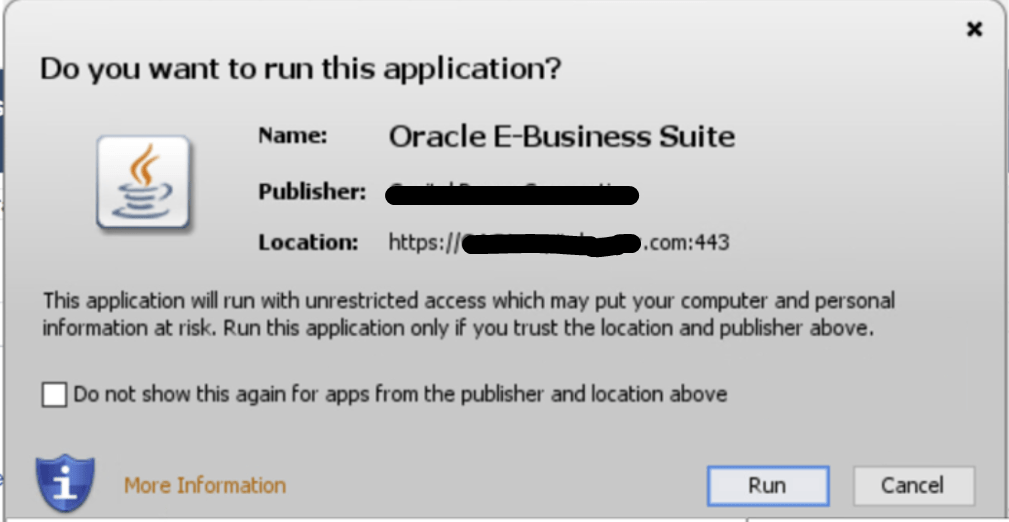
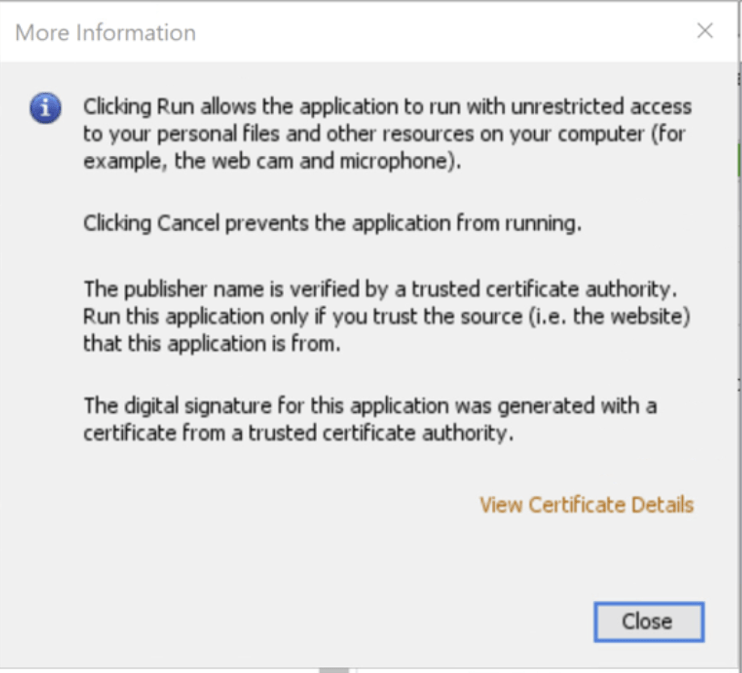
Click on “More Information” to view the certificate chain and other details like algorithms, validity, etc.
Verify Jar files are signed with new certificate
From the Desktop client, do the following –
- Control Panel > Java > Security > Manage Certificates > ‘Certificate Type: Trusted Certificates’
- Select the certificate and ‘Export’ it to desktop.
- Double click on the saved certificate and view the ‘General’, ‘Details’ and ‘Certification Path’ tabs to verify the entries match with those when you created the key pair.
You do not need a new code signing digital certificate for each of your multiple environments. A single code signing digital certificate is sufficient to sign your JAR files across various environments. After successfully signing your Oracle E-Business Suite instance with a Trusted CA in the source environment, you can use the same ‘code signing digital certificate’ in other Oracle E-Business Suite environments (target environments). This can be accomplished by transferring the relevant files from the source environment to the target environment.
 AninditaK