This blog outlines steps to clone an Oracle E-Business Suite (EBS) Release 12.2 system with Oracle Database 19c using Rapid Clone. Unlike EBS applications running on pre-19c Oracle databases, this configuration is structured as multitenant with EBS database being the pluggable database within a container database.
To initiate the process of cloning…
Prepare source Oracle EBS instance for cloning
Prepare source system database tier
- Ensure all processes are running in source system database tier.
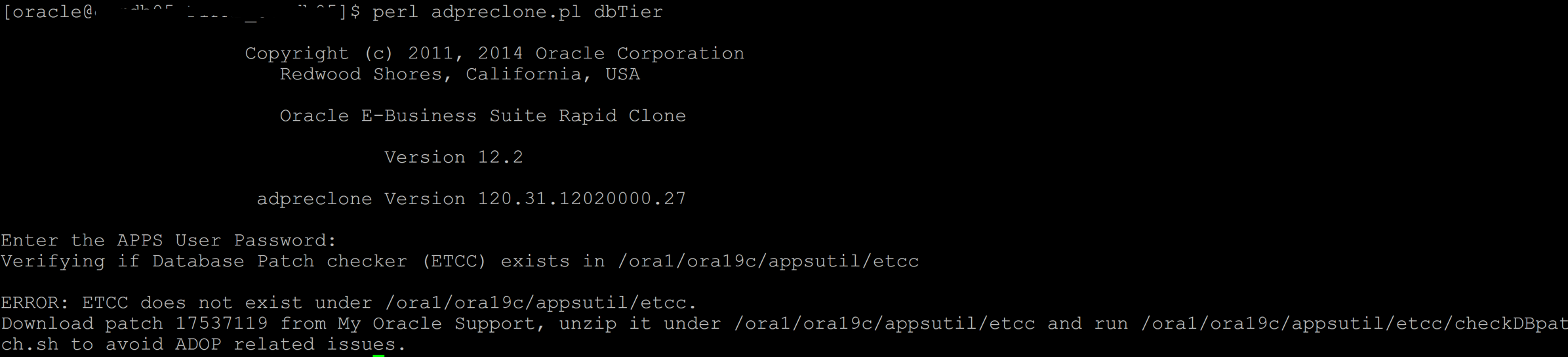
- Download and copy latest ETCC patch under ORACLE_HOME/appsutil for preclone to complete successfully.
- Source PDB environment file and run adpreclone dbTier.
- Create tar backup of source database Oracle Home (or not by comparing binaries of source and target Oracle Homes).
- Create and initiate backup of source database to take an online or offline RMAN backup.
Prepare source system application tier
- Source the Run FS and execute adpreclone appsTier.
- Create tar backup of source application tier Run FS EBSapps directory.
Note: Run FS in source can either be the FS1 or FS2. If FS2 is the Run FS on the source, then on the target, EBSapps directory should be extracted under FS2.
Clone target database tier
Note: Backup configuration files of the target database and application tier, like context files, pfile, tns, etc. which will be used to configure target environment.
Begin by first bringing down target application tier.
Drop target database
. TGTCDB_hostname.env

sqlplus / as sysdba
SQL> shu immediate
SQL> startup mount exclusive restrict;
SQL> select instance_name,status,logins from v$Instance;
INSTANCE_NAME    STATUS       LOGINS
---------------- ------------ ----------
TGTCDB           MOUNTED      RESTRICTED

SQL> show pdbs;
    CON_ID CON_NAME                       OPEN MODE  RESTRICTED
---------- ------------------------------ ---------- ----------
         2 PDB$SEED                       MOUNTED
         4 TGTPDB                         MOUNTED

SQL> drop database;
Database dropped.
Duplicate target database
- Create and execute RMAN duplicate script to restore/recover target database from source backup files, using target database pfile.
Configure target CDB-PDB environment
- Ensure PDB is open in read-write mode else execute “alter pluggable database all open”.
SQL> show pdbs;

    CON_ID CON_NAME                       OPEN MODE  RESTRICTED
---------- ------------------------------ ---------- ----------
         2 PDB$SEED                       READ ONLY  NO
         3 SRCPDB                         READ WRITE NO
- Change PDB name to that of target.
SQL> alter session set container=SRCPDB;

SQL> select count(*) from cdb_services c, service$ s       ### Ensure no service exists with target PDB name
     where upper(s.name) = upper('TGTPDB')
     and s.deletion_date is null
     and s.name = c.name;
  COUNT(*)
----------
         0

SQL> alter pluggable database SRCPDB close;                ### Rename the PDB
SQL> alter pluggable database SRCPDB unplug into '/full/path/to/ORACLE_HOME/dbs/SRCPDB.xml';
SQL> drop pluggable database SRCPDB;

SQL> create pluggable database TGTPDB using '/full/path/to/ORACLE_HOME/dbs/SRCPDB.xml' NOCOPY SERVICE_NAME_CONVERT=('ebs_SRCPDB','ebs_TGTPDB','SRCPDB_ebs_patch','TGTPDB_ebs_patch');
SQL> alter pluggable database SRCPDB open read write;

SQL> show pdbs;

    CON_ID CON_NAME                       OPEN MODE  RESTRICTED
---------- ------------------------------ ---------- ----------
         2 PDB$SEED                       READ ONLY  NO
3 SRCPDB READ WRITE NO- Start source PDB and save its state
SQL> alter pluggable database all open;
SQL> alter pluggable database all save state;- Check for any PDB violations while logged in to CDB
SQL> select name,cause,type,message,status from PDB_PLUG_IN_VIOLATIONS where type = 'ERROR' and status <> 'RESOLVED';- Run library update script against the database
cd $ORACLE_HOME/appsutil/install/TGTPDB_hostname
sqlplus / as sysdba @adupdlib.sql so

**********************
Connected to:
Oracle Database 19c Enterprise Edition Release 19.0.0.0.0 - Production
Version 19.11.0.0.0

PL/SQL procedure successfully completed.
Set target UTL_FILE_DIR values in database
- Obtain the existing value for the UTL_FILE_DIR
cd /full/path/to/ORACLE_HOME
source TGTPDB_hostname.env

perl $ORACLE_HOME/appsutil/bin/txkCfgUtlfileDir.pl -contextfile=$ORACLE_HOME/appsutil/TGTPDB_hostname.xml \
> -oraclehome=/full/path/to/ORACLE_HOME -outdir=$ORACLE_HOME/appsutil/log -mode=getUtlFileDir

Enter the APPS Password:
************************
==============================================================================
Successfully generated the below file with UTL_FILE_DIR content:
/full/path/to/ORACLE_HOME/dbs/TGTPDB_utlfiledir.txt
==============================================================================
*************************
Successfully Completed the script
ERRORCODE = 0 ERRORCODE_END
- Review and edit TGTPDB_utlfiledir.txt as necessary and run the following to store the updated values for UTL_FILE_DIR in the database.
perl $ORACLE_HOME/appsutil/bin/txkCfgUtlfileDir.pl -contextfile=$ORACLE_HOME/appsutil/TGTPDB_hostname.xml \
> -oraclehome=/full/path/to/ORACLE_HOME -outdir=$ORACLE_HOME/appsutil/log -mode=setUtlFileDir

Enter the APPS Password:
*************************
Enter the ebs_system Password:- Create directory object for the outbound directory (pointed to by the s_outbound_dir context variable in the database tier context file)
perl $ORACLE_HOME/appsutil/bin/txkCfgUtlfileDir.pl -contextfile=$ORACLE_HOME/appsutil/TGTPDB_hostname.xml \
> -oraclehome=/full/path/to/ORACLE_HOME -outdir=$ORACLE_HOME/appsutil/log -mode=createDirObject

Enter the APPS Password:
*************************
Enter the ebs_system Password:- Sync up the value of UTL_FILE_DIR in the database tier context file
perl $ORACLE_HOME/appsutil/bin/txkCfgUtlfileDir.pl -contextfile=$ORACLE_HOME/appsutil/TGTPDB_hostname.xml \
> -oraclehome=/full/path/to/ORACLE_HOME -outdir=$ORACLE_HOME/appsutil/log -mode=syncUtlFileDir -skipautoconfig=yes

Enter the APPS Password:
Configure target database tier
Run the adcfgclone utility to configure the target database using $CONTEXT_FILE using dbconfig to not recreate Controlfiles.
. /full/path/to/ORACLE_HOME/TGTCDB_hostname.env
cd $ORACLE_HOME/appsutil/clone/bin

perl adcfgclone.pl dbconfig $ORACLE_HOME/appsutil/TGTPDB_hostname.xml
**************************
Completed Apply...
Fri Nov 11 10:26:13 2022
Skipping the starting of services for db19c .


cd $ORACLE_HOME/appsutil/scripts/TGTPDB_hostname
./adautocfg.sh
**************************
AutoConfig is configuring the Database environment...
**************************
Value of s_dbcset is WE8ISO8859P1

Character set is present in the allowed list. No need to add orai18n.jar to the CLASSPATH.
**************************
Updating Context file...COMPLETED
        Attempting upload of Context file and templates to database...COMPLETED

Updating rdbms version in Context file to db19
Updating rdbms type in Context file to 64 bits
Configuring templates from ORACLE_HOME ...

AutoConfig completed successfully.
Configure and clone target application tier
- Create directories fs1 and fs2 under <s_base> where s_base is the top level directory for EBS application file system, e.g. /u01/R122_EBS/fs1 and /u01/R122_EBS/fs2. Ensure target environment file is under s_base and Central Inventory is created.
- Extract source EBSapps tar backup under fs1 or fs2(depending on which was the Run FS in the source system).
- Configure target application tier with the backup of target application $CONTEXT_FILE and “dual fs” option.
cd /s_base/fs1/EBSapps/comn/clone/bin
perl adcfgclone.pl appsTier /full/path/to/target/application/backup_context_file/$CONTEXT_NAME.xml dualfs

***********************
Enter the APPS password :

Enter the Weblogic AdminServer password :
***********************
Creating Patch file system context file.....
***********************
Target System Other File System Instance Top set to /s_base/fs2/inst/apps/$CONTEXT_NAME

Target System Port Pool [0-99] : 1
Checking the port pool 1
done: Port Pool 1 is free
***********************
Configuring: Run file system....
Configuring: Patch file system....
***********************
Do you want to startup the Application Services for $TWO_TASK? (y/n) [n] : n

Services not started
. /s_base/EBSapps.env run
cd $ADMIN_SCRIPTS_HOME
./adautocfg.sh
************************
wlsDomainName: EBS_domain
WLS Domain Name is VALID.
AutoConfig is configuring the Applications environment...
************************
Configuring AHL_TOP.......COMPLETED
Configuring IES_TOP.......COMPLETED
Configuring OZF_TOP.......COMPLETED
Configuring CSD_TOP.......COMPLETED
Configuring IGC_TOP.......COMPLETED
AutoConfig completed successfully.- Start target application tier services and complete post clone steps.
- Run fs_clone.
. /s_base/EBSapps.env run

adop phase=fs_clone

Enter the APPS password:
Enter the EBS_SYSTEM password:
Enter the WLSADMIN password:
Ref: Cloning Oracle E-Business Suite Release 12.2 with Multitenant Database Using Rapid Clone (Doc ID 2552208.1)
Hope this helps!!
 AninditaK